ICS 111 Homework Assignment H02: Calculate Change
Purpose
We are going to continue our problem solving education by writing a program that helps a cashier calculate the correct change. This will help us understand how Java does integer math and explore the division and modulus operators.
We will also get more practice using Eclipse to make our programming life easier.
Tasks
1. Create a package named edu.ics111.h02 in your ICS111-workspace project
This is where we will put all our classes for homework 02. To create a package right mouse click on the project, choose new, then choose package.

2. Create a program to help a cashier calculate the correct change.
Write a program that helps a cashier calculate the correct change. The program should ask how how much the item cost. Then ask how much was paid. The program should tell the cashier how many dollars, quarters, dimes, nickels and pennies they should give the customer as change.
Now use the ICS 111 Programming Algorithm to start the problem solving process.
1. Read and understand the problem.
Do you understand what the program needs to do?
2. & 3. Create the Java file for your program and insert the Java boilerplate
I’ve chosen to call my program CorrectChange so I’m going to create the Java class CorrectChange in the homework 02 package by clicking File -> New -> Class then filling out the dialog box you see next.
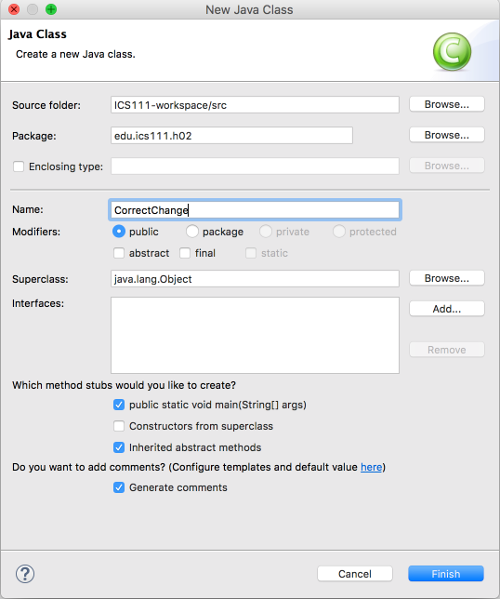
Make sure you click the public static void main(String[] args) option and the Generate comments option. Here is what my Eclipse gave me.

As you can see I need to fill out the comments for the program and main subroutine.
Now you should have the boilerplate code now you can start working on solving the problem.
4. & 5. Write the steps to solve the problem as comments in main and refine them
“What are the steps needed to solve this problem?” Write them down as comments in the main method. Once you have the steps start refining them till you can write Java code.
- You can use the TextIO.java class for getting the cost of the item and how much money was paid. I’ve modified this class to be in the edu.ics111.h02 package.
- Or you can use the java.util.Scanner class to get the user’s inputs. Remember to close the scanner when you are done with it.
- Remember to ask the question before you get the answer. I see alot of beginning student programs getting the answer before they ask the question.
- Once you have the amount of money to give back, you should use the ‘/’ and ‘%’ operators to figure out the number of dollars, quarters, dimes, nickels and pennies.
Grading Rubric
| Criterion | Excellent (3) | Adequate (2) | Substandard (1) | Not Even Close (0) |
|---|---|---|---|---|
| Adherence to standards 20% Does it conform to standards in every detail? |
No errors. | Minor details of the assignment are violated, or poor choices are made where the assignment is unclear. | Significant details of the assignment or the underlying program intent are violated, but the program still fulfills essential functions. | Misses the point of the assignment. |
| Breakdown (modular design) 10% Does it demonstrate good modular design? |
No errors. | 1-3 minor errors. | > 3 minor errors OR 1 major error. | > 1 major error. |
| Correctness of code 50% Does it work? Does it pass JUnit? |
Passes all tests. | Works for typical input, may fail for minor special cases. | Fails for typical input, for a minor reason. | No. |
| Documentation, and style 20% Is it clear and maintainable? Does it pass CheckStyle? |
No errors. | 1-3 minor errors. | > 3 minor errors OR 1 major error. | > 1 major error. |
Turning in the Assignment
The assignment is due on Friday, September 8th at 11:55pm. You may turn it in early.
-
Conduct a personal review of your code before turning it in. Does your code follow the Java Coding Standard?
- Is it clear and well commented?
- Does it pass Checkstyle?
-
Test your code.
- Does it produce the correct output? What happens when the customer doesn’t pay enough?
-
Export your ICS111-workspace project by choosing File -> Export. Name the zip file H02.zip.
-
Sign into Laulima, then navigate to the ICS111 site. In the left hand side of the site, there is an Assignments tab/link. Click on it and view all of the posted assignments. Select the assignment that you want to turn in and attach your H02.zip file and accept the honor pledge to submit the assignment.