ICS 211 Homework H02: OOP, Class Hierarchies and Interfaces.
Purpose
Object Oriented Programming (OOP) is a very useful tool for problem solving. We can break down a problem into its components, model them as classes and instances to solve the problem. We are also going to explore different ways of comparing instances.
We are going to enhance our understanding of OOP, class hierarchies and interfaces by creating a simple Java class hierarchy of Cheese and a Fromager. The Fromager implements an interface and follows the Factory and Singleton design patterns. In addition to the Cheeses and Fromager we are going to develop two different Comparators for comparing cheeses.
The Cheese class hierarchy looks like 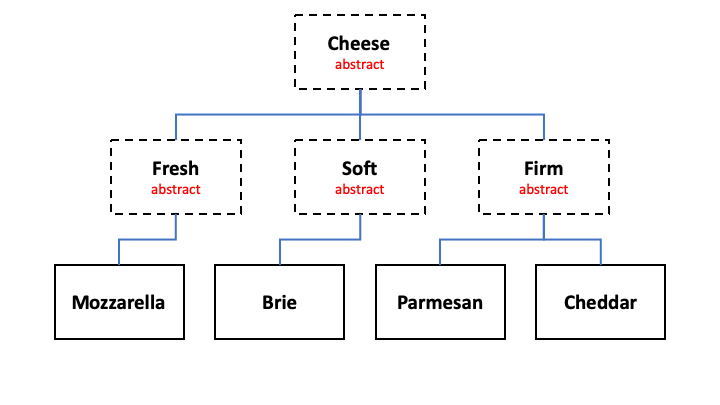
This assignment will give you practice using Eclipse to create and test Java classes. Hopefully, you have set up your Eclipse environment to make this assignment easier to complete.
-
You could use the New -> Class option to help you build the class heirarchy.
-
You could set up Eclipse’s Java -> Code Templates -> Comments to automatically conform to the Checkstyle guidelines. This will make your programming lives much simpler.
-
You could set up Eclipse to use checkstyle to show you any style errors in your code.
-
Or you can do it all by yourself and spend much more time typing and getting the homework done.
Tasks
1. Create a package named edu.ics211.h02
This is where we will put all our classes for homework 2.
2. Create the Java Enums, Interfaces and Classes needed for this homework assignment
The Java files you need are: ManoaCheeseFromagerTest.java, CheeseFromager.java, and CheeseType.java.
The easiest way is to right mouse click on the link and choose “Save Link As…”. Save the files into your edu.ics211.h02 directory. Or you can use eclipse and create each of the files then replace their contents with the Java code.
- The
ManoaCheeseFromagerTestis JUnit 4 tests for theManoaCheeseFromagerclass you are going to create. - The
CheeseFromagerinterface defines the methods needed for a Cheese Fromager. - The
CheeseTypeenum defines the valid types of Cheese for this assignment, FRESH, SOFT, and FIRM.
To get the tests to run you will need to add the JUnit 4 library to your eclipse project.
3. Create the base abstract class Cheese that implements Comparable<Cheese>
Choose New -> Class.

Make sure you add the Comparable<Cheese> interface and click the abstract modifier before you click finish.
Here’s a screen shot of my Cheese class the eclipse created. Notice the compareTo method was automatically created.
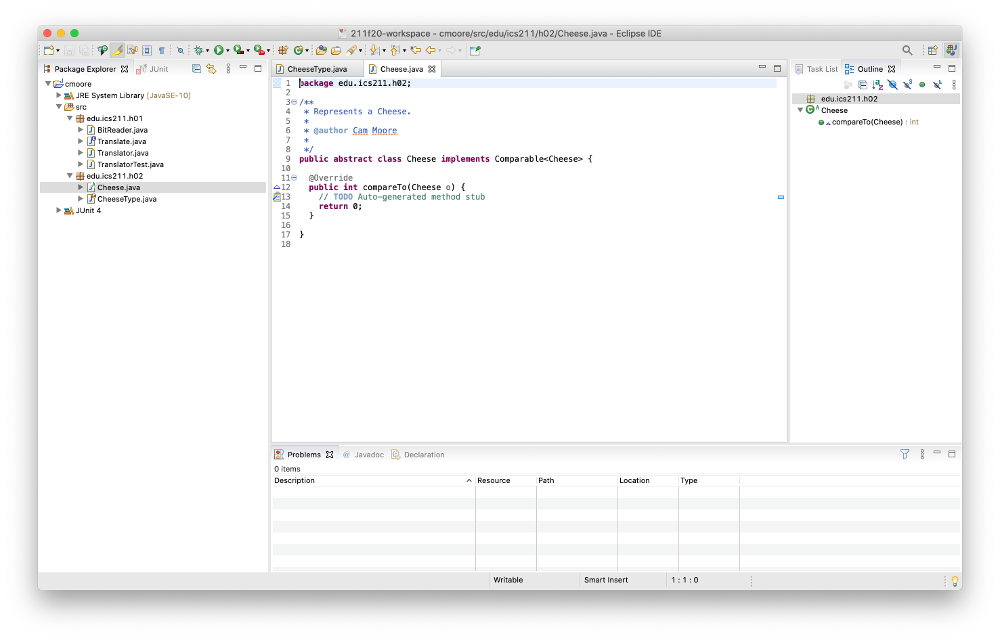
Modify the base abstract class Cheese so that it has:
- A private String member variable called name.
- A private CheeseType member variable called type.
- A private Double member variable called fatPercentage.
- A protected constructor with parameters: name, type and percentFat.
- The compareTo method should compare the Cheeses’ name.
- There should be get methods for all the member variables.
- There should be one set method for changing the name of the Cheese.
The Cheese class must be abstract. You cannot create an instance of a generic Cheese. You can only create instances of the concrete subclasses.
Here’s a screen shot of my Cheese class in Eclipse.

Notice there are no Problems in my project. That means that there are no compile or checkstyle errors.
4. Create three abstract classes Fresh, Soft and Firm that extends Cheese
These classes have:
- A protected constructor with three parameters: name, type, and fat percentage.
5. Create the Mozzarella, Brie, Parmesan and Cheddar classes
Class Mozzarella extends Fresh, Brie extends Soft and Parmesan and Cheddar extend Firm all have:
- A constructor with two parameters: name, and fatPercentage. Be sure to set the CheeseType correctly.
- A constructor with one parameter: name. This constructor should set the fatPercentage to a random value between 5% and 60%. Be sure to set the CheeseType correctly.
6. Create the ManoaCheeseFromager class
Create a ManoaCheeseFromager singleton class that can create Mozzarella, Brie, Parmesan and Cheddar Cheeses. Singleton classes have a static method getInstance() that returns the one and only one instance of the class. The class must implement the CheeseFromager interface.
Here’s a screen shot of my ManoaCheeseFromager class.

Notice there are no Problems in my project. That means that there are no compile or checkstyle errors.
Implement the CheeseFromager methods. The makeCheese method should check the CheeseType then bake a random Cheese of that type.
At this point you can test your code with ManoaCheeseFromagerTest.java. We are going to use the JUnit tests to evaluate your homework for correctness.
7. (Optional) Create some Comparators
Next week’s homework is sorting an array of Cheese. You will need to create two comparators to do the sorting, so you can get a head start on next week’s homework by:
-
Creating a FatComparator that implements Comparator<Cheese> deciding based upon the Cheeses’ fat percentage values.
-
Creating an TypeComparator that implements Comparator<Cheese> deciding based upon the type of the Cheeses.
You can test your comparators using CheeseComparatorTest.java.
Grading Rubric
| Criterion | Excellent (100%) | Satisfactory (75%) | Borderline (50%) | Unsatisfactory (25%) | Poor (0) |
|---|---|---|---|---|---|
| Adherence to standards - 2 points Does it conform to standards in every detail? |
No errors. | Minor details of the assignment are violated, or poor choices are made where the assignment is unclear. | Significant details of the assignment or the underlying program intent are violated, but the program still fulfills essential functions. | Significant details of the assignment or the underlying program intent are violated, but the program still fulfills some essential functions. | Misses the point of the assignment. |
| Breakdown (modular design) - 1 point Does it demonstrate good modular design? |
No errors. | 1-3 minor errors. | > 3 minor errors OR 1 major error. | 2 major errors | > 2 major error. |
| Correctness of code - 4 points Does it work? Does it pass JUnit? |
Passes all tests. | Works for typical input, may fail for minor special cases. | Fails for typical input, for a minor reason. | Fails for typical input, for a major reason. | No. |
| Documentation, and style - 2 points Is it clear and maintainable? Does it pass CheckStyle? Are your steps documented? |
No errors. | 1-3 minor errors. | > 3 minor errors OR 1 major error. | 2 major errors | > 2 major error. |
| Efficiency of code - 1 point Does it use the Java features well? |
No errors. | 1-3 minor errors. | > 3 minor errors OR 1 major error. | 2 major errors | > 2 major error. |
Turning in the Assignment
The assignment is due on Friday at 11:55pm. You may turn it in early.
- Does your code follow the Java Coding Standard and pass CheckStyle?
- Does your code pass the JUnit Tests?
-
Export your project by choosing File -> Export. Under General choose Archive File.

On the next dialog choose only the src directory in your project. Make sure the .checkstyle, .classpath, and .project files are selected.
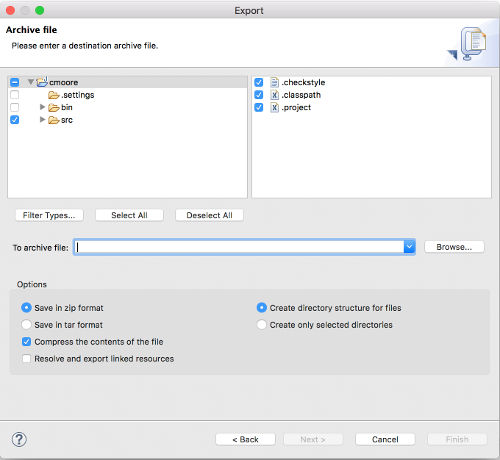
Name the zip file <your username>H02. So my zip file would be
cmooreH02.zip. Remember where eclipse saves the file. - Sign in to Laulima, then navigate to the ICS211 site. In the left-hand side of the site, there is an Assignments tab/link. Click on it and view all the posted assignments. Select the assignment that you want to turn in and attach your <username>H02.zip file and accept the honor pledge to submit the assignment. Yes, the pledge says you worked alone, but in ICS 211 you can work together as long as you give credit to you teammates. See the Giving Credit screen cast.