E59: Deploy nextjs-application-template
For this experience, you will learn how to deploy the nextjs-application-template app to Vercel in order to make it available for anyone to use who has access to the Internet and a browser. You will also learn how to monitor your “production” database at Vercel, and how to set up application performance monitoring.
To do this, perform all the steps in the following readings in order:
- How to deploy a Nextjs application to Vercel.
- How to inspect your Supabase database on Vercel using pgAdmin
Linking Supabase to pgAdmin
In order to find the hostname, port, username, and password, go to your Vercel Supabase dashboard in the tab Storage. Click on Show secret and you will only really need the first URL called POSTGRES_URL.
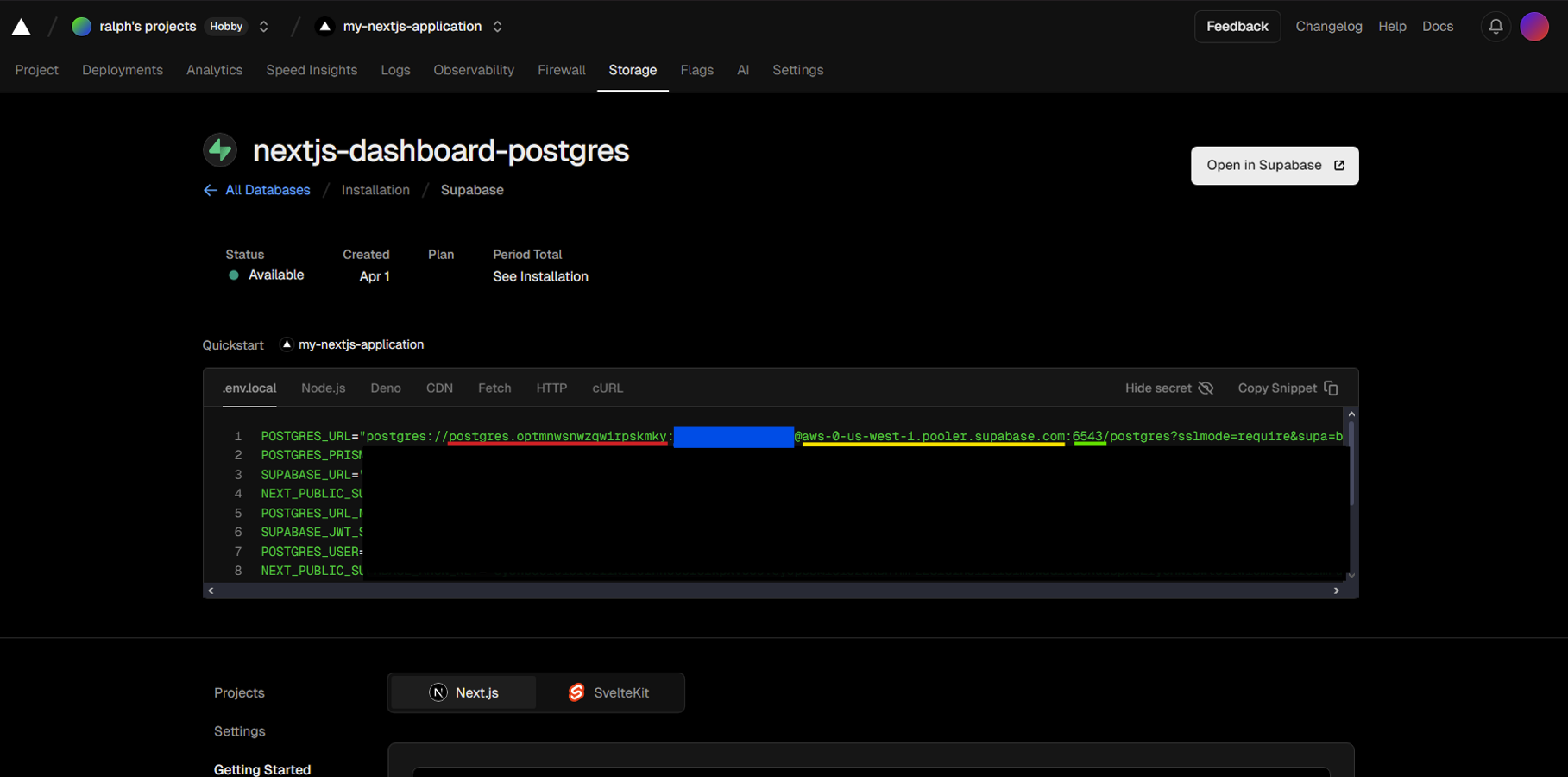
The text highlighted in red is your Username The text highlighted in blue is your Password (obfuscated here) The text highlighted in yellow is your Host name/ address The text highlighted in green is your Port
If you are getting errors, that you don’t understand how to resolve, feel free to ask a #smart-question.
Submission
By the date and time indicated on the Calendar page, please finish all of these steps. Create two screenshots:
- Your Nextjs application (retrieved using a URL like “https://my-nextjs-application-rho.vercel.app/”).
- Your pgAdmin screen showing a connection to your Nextjs application.
Post them to the #deployment channel.