https://bit.ly/4hcdYKC
WOD: Surf Score
Take out your WOD-velope and write today’s date and “Surf Score” on your index card.

The World Surf League (WSL) provides the following rules for scoring a surfing competition:
- A panel of 5 judges each independently scores a surfers ride.
- Each score is on a scale of 1-10 with one decimal place.
- When computing the overall score, scores are eliminated as shown in the image below (note the scores are ordered from lowest to highest):

- The score for the ride is the average of the remaining scores.
Implement two Typescript classes that together implement these rules for scoring a ride.
- Score. Objects created from the Score class represent an individual score given by a judge. The
constructorfor this class should take two arguments:judgewhich is the name of the judge, andscorewhich is a Number indicating the score. - Ride. Objects created from the Ride class implement a way to represent all the scores provided by judges for a given ride, and the overall score. A Ride instance is constructed with one argument:
surferwhich is a string representing the name of the surfer.
The Ride class has the following methods in addition to its constructor:
- addScore(score). Stores the passed Score instance in order to associate it with the current Ride.
- printAllScores(). Prints the judge’s names and their scores for this Ride to the console, one per line. For example:
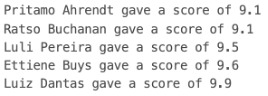
- printOverallScore(). Prints the final score for the Ride (averaging the selected scores as indicated previously) to the console. For example:

To simplify things, you may assume that calls to addScore are in order by increasing score. In other words, if the scores are 7.6, 8.3, 7.1, 9.2, and 9.8, then addScore will be called with scores in the following order: 7.1, 7.6, 8.3, 9.2, and 9.8.
IMPORTANT NOTE: For this WOD you may not use functional programming constructs such as `.reduce()` and `.map()`
To complete the WOD you must test your implementation. Start with this:
const ride = new Ride('John John Florence');
ride.addScore(new Score('Pritamo Ahrendt', 9.1));
continue using .addScore() to add the judges scores and output as given in the example. Then, use printAllScores() to print out the scores added. The output should look exactly like the example given for printAllScores() above. Lastly, use .printOverallScore() to get the example given above (again, it should look exactly like the example).
Implementation Note: For addScore(), you will likely want to use Array.push(). For push(), note that it mutates the array by adding the argument to the end of the array. Do not use the return value of push(), as you’ll likely get something you don’t expect.
For example:
const foo = [1, 2, 3];
const result = foo.push(4);
console.log(foo); // Prints: [1, 2, 3, 4]
console.log(result); // Prints: 4
Ready? Let’s begin:
-
Open TypeScript Playground. You may need to clear the code.
-
Create Typescript classes according to the specifications above.
-
Informally test your program by invoking the example code above.
-
When you are confident your code works correctly, press “Share” to create a URL to your Playground.
-
Raise your hand to let me know you have finished.
Rx: < 15 min Av: 15 - 21 min Sd: 21 - 25 min DNF: 25+ min
Submission instructions
After the WOD is over, you will submit your work using Laulima. When you login to your section in Laulima, you should find an open assignment with a title that includes the string Typescript 2 WOD.
Important: Your submission in Laulima must contain the following:
- The URL to your Typescript Playground containing your program. Be sure to press the Share button to create the URL.
- A copy of your Playground TypeScript code pasted into the body of the submission window.
- Copy this sentence exactly “Used AI: [Yes/No]” where you replace
[Yes/No]with either “Yes” if you used AI such as ChatGPT or GitHub Copilot, or “No” if you did not use AI any any capacity. This includes using AI enabled search and using AI to generate code, comments, or any other content even if the tool is embedded in your IDE such as Co-pilot. - Copy this sentence exactly “AI Used: [NA/tools used]” where you replace
[NA/tools used]with the AI tools you used e.g. ChatGPT, Co-Pilot. If you used multiple tools, list them all. If you did not use AI, then you can leave this as “NA”.
Failure to include all of the above will result in an automatic penalty of no credit for this WOD. This will be strictly enforced.
Important Notes
-
Do not edit your Playground URL after the WOD is over. If the contents of the Playground differ from the code in the body of the submission, then the minimum penalty is that you will receive no credit (DNF) for this WOD.
-
Do not discuss this WOD with members of other sections until the end of the week. We create slightly different WODs for each section, but discussing it creates a perception of unfair advantage. If we find you have shared information about the WOD with a student from another section, then the minimum penalty is that you will receive no credit for this WOD.
https://bit.ly/4hcdYKC