WOD: Buzz’s Original Steak House Lanikai Home Page
Buzz’s Original Steak House Lanikai is a restaurant in Kailua, Hawaii. For this WOD, you will create a web page using Bootstrap 5 inspired by their home page. When completed, it should look like this (click the image to see full size):
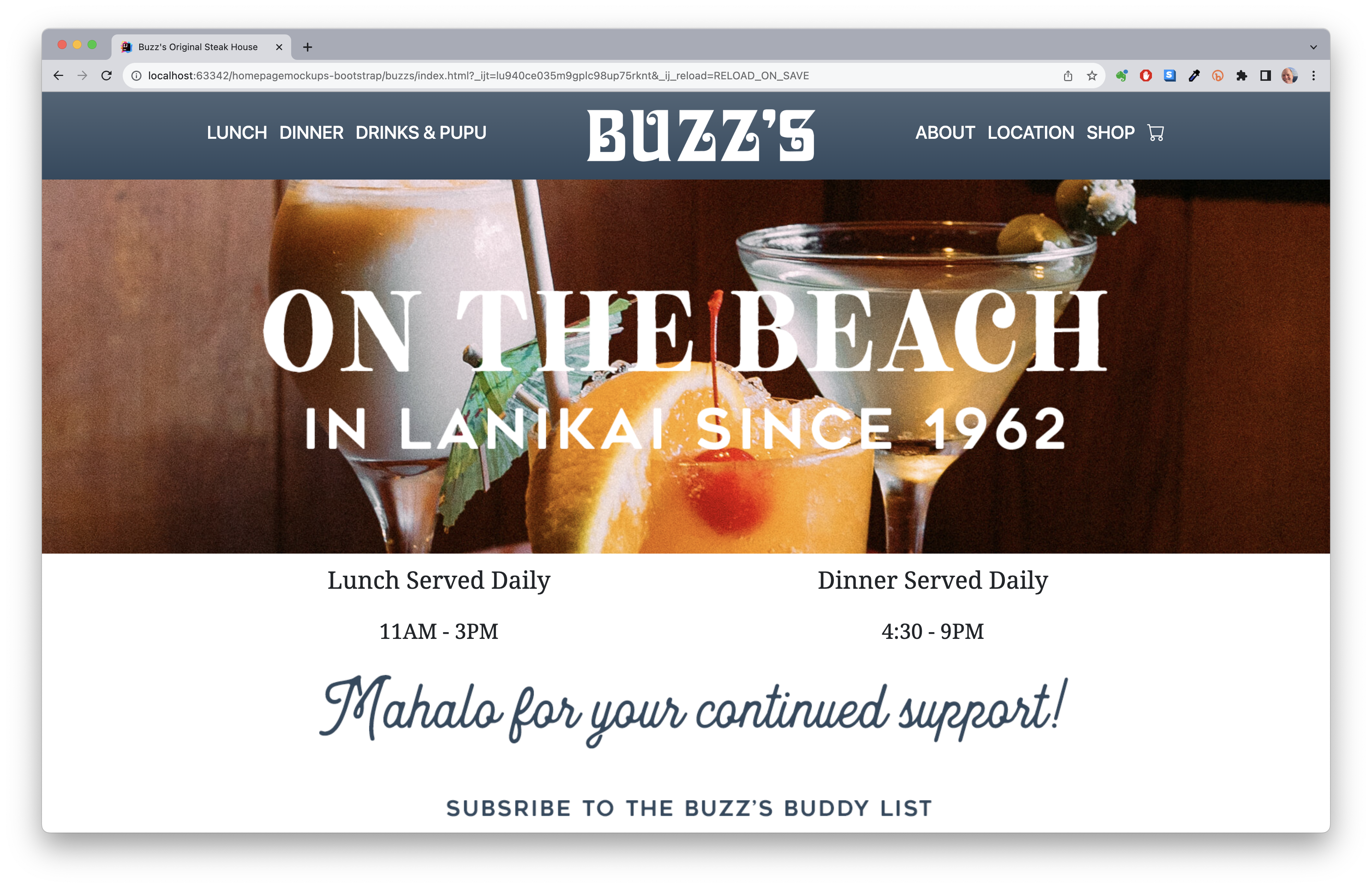
Note that you will find your code from the Experience Island Snow practice WOD and the Murphy’s in-class WOD to be very helpful.
There are three parts to the mockup site: a top menu, center image, and footer.
Note: you cannot use any of the CSS from the original website.
Here are the steps:
-
Create a private GitHub repository called
wod-buzzsand clone it to your computer. Use GitHub desktop to open the project in IDEA. - Add two files to your project:
index.htmlandstyle.css. -
Download sample.gitignore into the project directory, and rename it to .gitignore.
-
Load the Bootstrap 5 files into index.html following the instructions in Bootstrap 5 Hello World. Also load your (currently empty) style.css file.
-
Make sure the
bodyelement has the classes “d-flex flex-column min-vh-100”. Style thebodyto have The Buzz’s background image. Set the--bs-light-rgbCSS variable to48,73,95. - Create the navbar. Hint: in index.html, create a
divwith class “px-0 justify-content-center pb-2”. Within that, create a nesteddivwith class “navbar” and “bg-light”. Within that, create anotherdivwith the class “container” and a little y-padding. This div will contain the three elements of the top menu:- The Lunch, Dinner, and Drinks & Pupu menu items. Hint: use a
ulwith class “nav justify-content-start”. - The Buzz’s logo. Hint: use a
ulwith class “nav justify-content-center” and the Buzz’s logo. - The About, Location, shop and cart icon. Hint: use a
ulwith class “nav justify-content-end”. The links do not have to work.
- The Lunch, Dinner, and Drinks & Pupu menu items. Hint: use a
-
Create a div for the center wording. Hint: create a
divwith class “d-flex justify-content-center” with margin and padding. Inside thedivwe want animgwith On the Beach saying. Theimgshould have a width of 1200px. -
Create the bottom
footer. Hint create afooterwith the class “mt-auto py-3”. Themt-autopushes the footer to the bottom of the view;py-3give padding in the y-axis. In thefooterwe want adivwith the class “container” to give us some padding. Then two rows. The first row has twodivs with class “col text-center”. The second row has animgwith Buzz’s Mahalo. -
When you can preview your index.html file, and it looks equivalent to the screen image above, commit your repo to GitHub. (Note: you do not have to set the title of the page, but you can if you want to.)
-
Check to make sure it is present on GitHub.
-
Raise your hand when you are done. We will respond with your time for the WOD. Do not work on your solution after raising your hand.
- Once you are done, relax until the WOD is over. You do not have to complete the Submission instructions until the WOD is over.




Rx: <25 min Av: 25-35min Sd: 35-45 min DNF: 45+ min
Submission instructions
First, make sure your repository is private. If it is not private, retrieve your repo in a browser, then click on “Settings”, then “Options”, then scroll down to the “Danger Zone” and click on “Make this repository private”.
You must now grant read access to this private repo to the TA for your section. To do this:
- Retrieve your repository in a browser, then click on “Settings”. Depending upon the GitHub UI you are provided, you’ll then click on either “Collaborators” or “Manage Access”. Let us know if you can’t find either of these.
- For sections 001 and 002 search for “zerinnasrintumpa”, then click “Add collaborator”.
- For section 003 search for “giorgio-tran”, then click “Add collaborator”.
- For sections 004 and 005 search for “acatarinaoaraujo”, then click “Add collaborator”.
Second, submit your WOD via Laulima. When you login to your section in Laulima, you should find an open assignment with the label “WOD”.
Your submission should consist of
- The URL to your private GitHub repo containing your program and
- The answer to the question: Did you use GitHub Copilot or ChatGPT to help with this WOD?
Do not make any further commits to your GitHub repo. If there is a commit after the time at which you raised your hand, then the minimum penalty is that you will receive no credit for this WOD. If the repo is public, then you will receive no credit for this WOD.
Do not discuss this WOD with members of the other sections until tomorrow. We often create different WODs for each section, but discussing it creates a perception of unfair advantage. If I find you have shared information about the WOD with a student from another section, then the minimum penalty is that you will receive no credit for this WOD.
https://bit.ly/3PufXgL